ffmpeg \ mkvmerge error? #3

Closed
opened 2020-02-01 18:33:52 +00:00 by jnyfiveoh · 20 comments
jnyfiveoh commented 2020-02-01 18:33:52 +00:00 (Migrated from github.com)

After episode download completion saw the following:

[WARN] MKVMerge not found, skip using this...
[WARN] FFmpeg not found, skip using this...

Confirmed both exe files are in appropriate folder path within bin.

Has anyone else encountered this issue?

After episode download completion saw the following: [WARN] MKVMerge not found, skip using this... [WARN] FFmpeg not found, skip using this... Confirmed both exe files are in appropriate folder path within bin. Has anyone else encountered this issue?
XxUnkn0wnxX commented 2020-02-12 22:09:40 +00:00 (Migrated from github.com)

what does it say in your bin-path.yml? might need to hard link the paths in there. be sure your using the latest stable build of ffmpeg & mkvmerge.
make sure it's the CLI binary version of ffpmeg & mkvmerge cannot be GUI
could also be a permission issue, not sure how they are set on windows though as I'm on OSX

what does it say in your `bin-path.yml`? might need to hard link the paths in there. be sure your using the latest stable build of ffmpeg & mkvmerge. make sure it's the CLI binary version of ffpmeg & mkvmerge cannot be GUI could also be a permission issue, not sure how they are set on windows though as I'm on OSX
jnyfiveoh commented 2020-02-12 22:44:31 +00:00 (Migrated from github.com)

ffmpeg: ./bin/ffmpeg
mkvmerge: ./bin/mkvmerge

in each folder is ffmpeg.exe and mkvmerge.exe for command line use and not the gui exe

I will try updating ffmpeg and see what happens

ffmpeg: ./bin/ffmpeg mkvmerge: ./bin/mkvmerge in each folder is ffmpeg.exe and mkvmerge.exe for command line use and not the gui exe I will try updating ffmpeg and see what happens
Jougan commented 2020-02-14 04:49:33 +00:00 (Migrated from github.com)

Make sure both ffmpeg.exe and mkvmerge.exe are directly in the bin folder, and not in their own folders in bin folder

Make sure both ffmpeg.exe and mkvmerge.exe are directly in the bin folder, and not in their own folders in bin folder
jnyfiveoh commented 2020-02-14 06:48:26 +00:00 (Migrated from github.com)

Make sure both ffmpeg.exe and mkvmerge.exe are directly in the bin folder, and not in their own folders in bin folder

Still encountering same issue. Started happening when I updated NodeJS to most recent version
Confirmed exes are in the appropriate locations even created duplicate exe files.
One thing that I did notice is running 'npm i' again I got the following;
created a lockfile as package-lock.json. You should commit this file

> Make sure both ffmpeg.exe and mkvmerge.exe are directly in the bin folder, and not in their own folders in bin folder Still encountering same issue. Started happening when I updated NodeJS to most recent version Confirmed exes are in the appropriate locations even created duplicate exe files. One thing that I did notice is running 'npm i' again I got the following; created a lockfile as package-lock.json. You should commit this file
Jougan commented 2020-02-14 08:56:03 +00:00 (Migrated from github.com)

I did have it working, but decided to start fresh to see what's going on. Now i'm getting the same issue as you. Will keep looking into it.

I did have it working, but decided to start fresh to see what's going on. Now i'm getting the same issue as you. Will keep looking into it.
Atemu commented 2020-02-14 19:43:08 +00:00 (Migrated from github.com)

Make sure you adjust the paths inside the YAML file to have the .exe extension.

Make sure you adjust the paths inside the YAML file to have the .exe extension.
jnyfiveoh commented 2020-02-15 00:08:27 +00:00 (Migrated from github.com)

Make sure you adjust the paths inside the YAML file to have the .exe extension.

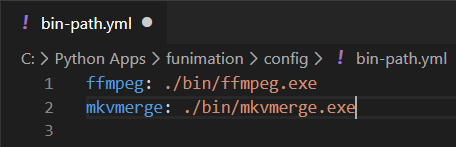
Changed the path inside bin-path.yml to:
ffmpeg: ./bin/ffmpeg.exe
mkvmerge: ./bin/mkvmerge.exe

No joy...

> Make sure you adjust the paths inside the YAML file to have the .exe extension. Changed the path inside bin-path.yml to: ffmpeg: ./bin/ffmpeg.exe mkvmerge: ./bin/mkvmerge.exe No joy...
Atemu commented 2020-02-15 11:53:32 +00:00 (Migrated from github.com)

But the paths exist if you try to ls them from the same working dir you run funi.js from?

But the paths exist if you try to `ls` them from the same working dir you run funi.js from?
jnyfiveoh commented 2020-02-15 16:12:30 +00:00 (Migrated from github.com)

Im not following,
Please note I am using Windows 10

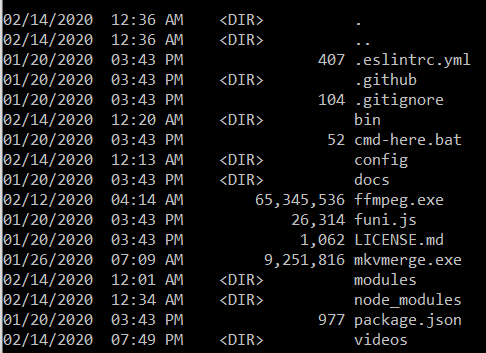
Attached image of main folder and bin folder contents and bin-path.yml file
Main

bin

image

Im not following, Please note I am using Windows 10 Attached image of main folder and bin folder contents and bin-path.yml file ![Main](https://user-images.githubusercontent.com/47425729/74591222-2d9a4480-4fd3-11ea-9512-a45f4b071706.PNG) ![bin](https://user-images.githubusercontent.com/47425729/74591228-49054f80-4fd3-11ea-898b-4849deb4d7f3.PNG) ![image](https://user-images.githubusercontent.com/47425729/74591248-84a01980-4fd3-11ea-982b-a5029e71b5ed.png)
jnyfiveoh commented 2020-02-15 16:33:57 +00:00 (Migrated from github.com)

Even tried this configuration
image

Even tried this configuration ![image](https://user-images.githubusercontent.com/47425729/74591433-30963480-4fd5-11ea-9fee-d6bf11dbfc1f.png)
Atemu commented 2020-02-16 11:16:07 +00:00 (Migrated from github.com)

They need to either go into the bin/ subdirectory or you edit the paths to be ./ffmpeg etc.

They need to either go into the `bin/` subdirectory or you edit the paths to be ./ffmpeg etc.
jnyfiveoh commented 2020-02-16 18:26:59 +00:00 (Migrated from github.com)

They need to either go into the bin/ subdirectory or you edit the paths to be ./ffmpeg etc.

Yes I understand that. I created duplicate .exe files and copied them in the root folder as well as the bin folder, etc.
For some reason, it seems the *.js script is ignoring the bin-path.yml config file.

> They need to either go into the `bin/` subdirectory or you edit the paths to be ./ffmpeg etc. Yes I understand that. I created duplicate .exe files and copied them in the root folder as well as the bin folder, etc. For some reason, it seems the *.js script is ignoring the bin-path.yml config file.
Atemu commented 2020-02-17 08:03:38 +00:00 (Migrated from github.com)

And your working dir is the same as funi.js is in?

And your working dir is the same as funi.js is in?
Jougan commented 2020-02-17 12:26:38 +00:00 (Migrated from github.com)

Here is a fix, I replaced the config code in funi.js with the previous versions. This zip contains the now working funi.js, and config-main.yml. Put config-main.yml in the config folder
Funi-DL.zip

Here is a fix, I replaced the config code in funi.js with the previous versions. This zip contains the now working funi.js, and config-main.yml. Put config-main.yml in the config folder [Funi-DL.zip](https://github.com/anidl/funimation-downloader-nx/files/4213694/Funi-DL.zip)
jnyfiveoh commented 2020-02-17 17:03:05 +00:00 (Migrated from github.com)

And your working dir is the same as funi.js is in?

If you are asking if I am using the node command from the same location as the funi.js file, then yes.

> And your working dir is the same as funi.js is in? If you are asking if I am using the node command from the same location as the funi.js file, then yes.
jnyfiveoh commented 2020-02-17 17:03:26 +00:00 (Migrated from github.com)

Here is a fix, I replaced the config code in funi.js with the previous versions. This zip contains the now working funi.js, and config-main.yml. Put config-main.yml in the config folder
Funi-DL.zip

That completely broke me.
#!/usr/bin/env node
^

SyntaxError: Invalid or unexpected token
[90m at wrapSafe (internal/modules/cjs/loader.js:1067:16) [39m
[90m at Module._compile (internal/modules/cjs/loader.js:1115:27) [39m
[90m at Object.Module._extensions..js (internal/modules/cjs/loader.js:1171:10) [39m
[90m at Module.load (internal/modules/cjs/loader.js:1000:32) [39m
[90m at Function.Module._load (internal/modules/cjs/loader.js:899:14) [39m
[90m at Function.executeUserEntryPoint [as runMain] (internal/modules/run_main.js:71:12) [39m
[90m at internal/main/run_main_module.js:17:47 [39m

> Here is a fix, I replaced the config code in funi.js with the previous versions. This zip contains the now working funi.js, and config-main.yml. Put config-main.yml in the config folder > [Funi-DL.zip](https://github.com/anidl/funimation-downloader-nx/files/4213694/Funi-DL.zip) That completely broke me. #!/usr/bin/env node ^ SyntaxError: Invalid or unexpected token [90m at wrapSafe (internal/modules/cjs/loader.js:1067:16) [39m [90m at Module._compile (internal/modules/cjs/loader.js:1115:27) [39m [90m at Object.Module._extensions..js (internal/modules/cjs/loader.js:1171:10) [39m [90m at Module.load (internal/modules/cjs/loader.js:1000:32) [39m [90m at Function.Module._load (internal/modules/cjs/loader.js:899:14) [39m [90m at Function.executeUserEntryPoint [as runMain] (internal/modules/run_main.js:71:12) [39m [90m at internal/main/run_main_module.js:17:47 [39m
Jougan commented 2020-02-17 17:33:50 +00:00 (Migrated from github.com)

Here is a fix, I replaced the config code in funi.js with the previous versions. This zip contains the now working funi.js, and config-main.yml. Put config-main.yml in the config folder
Funi-DL.zip

That completely broke me.
#!/usr/bin/env node
^

SyntaxError: Invalid or unexpected token
[90m at wrapSafe (internal/modules/cjs/loader.js:1067:16) [39m
[90m at Module._compile (internal/modules/cjs/loader.js:1115:27) [39m
[90m at Object.Module._extensions..js (internal/modules/cjs/loader.js:1171:10) [39m
[90m at Module.load (internal/modules/cjs/loader.js:1000:32) [39m
[90m at Function.Module._load (internal/modules/cjs/loader.js:899:14) [39m
[90m at Function.executeUserEntryPoint [as runMain] (internal/modules/run_main.js:71:12) [39m
[90m at internal/main/run_main_module.js:17:47 [39m

Do you have Discord? It'd be easier to assist you on there

> > Here is a fix, I replaced the config code in funi.js with the previous versions. This zip contains the now working funi.js, and config-main.yml. Put config-main.yml in the config folder > > [Funi-DL.zip](https://github.com/anidl/funimation-downloader-nx/files/4213694/Funi-DL.zip) > > That completely broke me. > #!/usr/bin/env node > ^ > > SyntaxError: Invalid or unexpected token > [90m at wrapSafe (internal/modules/cjs/loader.js:1067:16) [39m > [90m at Module._compile (internal/modules/cjs/loader.js:1115:27) [39m > [90m at Object.Module._extensions..js (internal/modules/cjs/loader.js:1171:10) [39m > [90m at Module.load (internal/modules/cjs/loader.js:1000:32) [39m > [90m at Function.Module._load (internal/modules/cjs/loader.js:899:14) [39m > [90m at Function.executeUserEntryPoint [as runMain] (internal/modules/run_main.js:71:12) [39m > [90m at internal/main/run_main_module.js:17:47 [39m Do you have Discord? It'd be easier to assist you on there
jnyfiveoh commented 2020-02-17 17:35:16 +00:00 (Migrated from github.com)

Discord, yes.

Discord, yes.
jnyfiveoh commented 2020-02-17 18:04:24 +00:00 (Migrated from github.com)

Sweet! Issue resolved. Jougan's update \ patch resolved the issue. One item of note. Using most recent version of NodeJS and NPM will break it.

Per Jougan's suggestion of downgrading to node 12.4.0 and npm 6.9.0 made the script functional again.

-Thanks for the assist

Sweet! Issue resolved. Jougan's update \ patch resolved the issue. One item of note. Using most recent version of NodeJS and NPM will break it. Per Jougan's suggestion of downgrading to node 12.4.0 and npm 6.9.0 made the script functional again. -Thanks for the assist
anidl-git commented 2020-03-10 13:42:36 +00:00 (Migrated from github.com)
https://github.com/anidl/funimation-downloader-nx/releases/tag/4.5.1 should be fixed with latest release
Sign in to join this conversation.
No milestone
No project
No assignees
1 participant

Notifications
Due date
The due date is invalid or out of range. Please use the format "yyyy-mm-dd".

No due date set.

Dependencies

No dependencies set.

Reference: Creepso/multi-downloader-nx#3
No description provided.